Quick Start
Install StructArmed as a development dependency, initialize a preset, then run the analyser.
Contents
Installation
composer require --dev boundwize/structarmed
Initialize A Preset
# Defaults to --preset=psr4
vendor/bin/structarmed init

# Verify source paths match composer.json PSR-4 mappings
vendor/bin/structarmed init --preset=psr4

# Enforce basic coding standard rules
vendor/bin/structarmed init --preset=psr1

# PSR-12 extends PSR-1 with lowercase keyword constants and explicit member visibility checks
vendor/bin/structarmed init --preset=psr12

# PSR-15 middleware and request handler interface checks
vendor/bin/structarmed init --preset=psr15

# Thin controllers, model/view/service layer rules
vendor/bin/structarmed init --preset=mvc

# Layer isolation and DDD naming conventions
vendor/bin/structarmed init --preset=ddd

# Remove speculative abstractions: unimplemented interfaces, unextended abstract classes, unused traits
vendor/bin/structarmed init --preset=yagni

# Static closures and digit separators in large numeric literals
vendor/bin/structarmed init --preset=codequality

# Enable every preset at once
vendor/bin/structarmed init --preset=all
The generated structarmed.php file lives in your project root.
Analyse The Project
vendor/bin/structarmed analyse
The American spelling is also supported:
vendor/bin/structarmed analyze
If violations are found, StructArmed reports each one:
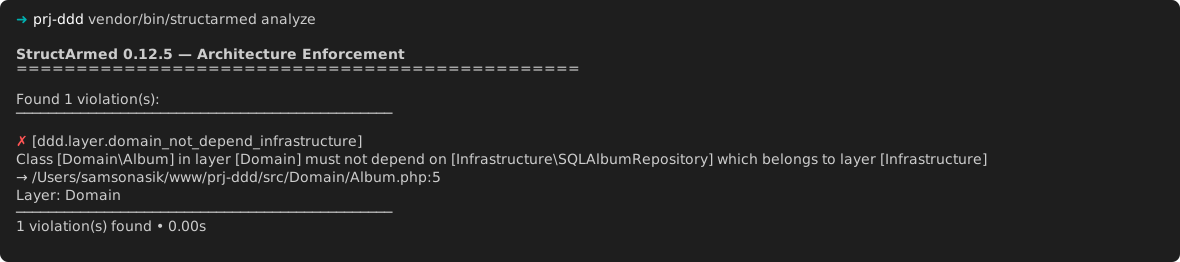
If a reported violation is marked as fixable, rerun the analyser with --fix to apply the available source changes automatically:
vendor/bin/structarmed analyse --fix
If everything passes, StructArmed prints a clean summary:

Default Configuration
<?php

// structarmed.php
use Boundwize\StructArmed\Architecture;
use Boundwize\StructArmed\Preset\Preset;

return Architecture::define()
    ->withPreset(Preset::PSR4());
Multiple Presets
->withPresets(
    Preset::PSR4(),
    Preset::PSR1(),
    Preset::PSR12(),
    Preset::PSR15(),
    Preset::MVC(),
    Preset::DDD(),
    Preset::CODEQUALITY(),
    Preset::YAGNI(),
)